How to Trade US Stock-Related Products and Stock Contracts with USDT on Hotcoin?

On Hotcoin, trading stock contracts with USDT starts with choosing TradFi contracts, and then verifying the product, the margin and the order. This article uses the web version of the TSLA/USDT perpetual contract as an example to show how to find the trading entry, recognise the market status and check the order parameters. What you trade here is a contract tied to a stock price, not Tesla shares held in a brokerage account; first-time users should understand leverage and liquidation risk first.
What do you need to prepare before you start?
Before trading Hotcoin TradFi, confirm that your account is eligible for the product concerned and prepare USDT that can be used in that trading account. Whether a product is open depends on your region, account status and platform rules, so a publicly accessible page does not by itself mean you can trade it. After logging in, complete the required verification steps and then check your account balance; funds arriving in your account and funds being available in the futures account are two different states.
How do you find TradFi stock contracts?
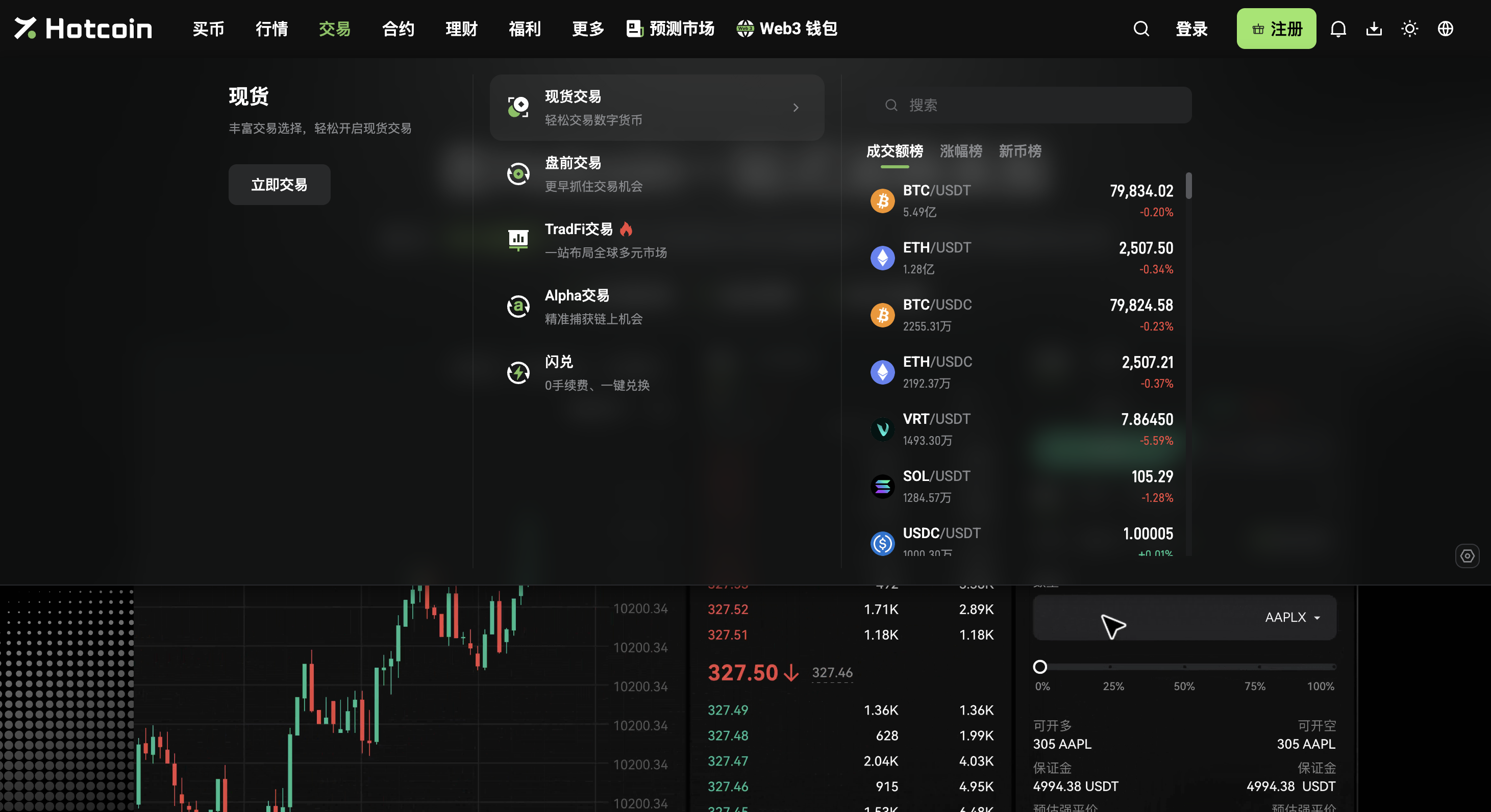
On the Hotcoin trading page, click the trading pair name in the top left corner to open the instrument selector, then switch to TradFi and to contracts. The panel also lists spot entries, so when you pick a stock-related product you still need to check the product type rather than relying on the name or the icon alone. Once you are on the target page, confirm that the top left corner shows the full trading pair together with the “perpetual” label; this article uses TSLA/USDT as the example, and other instruments should be checked against their own specifications.
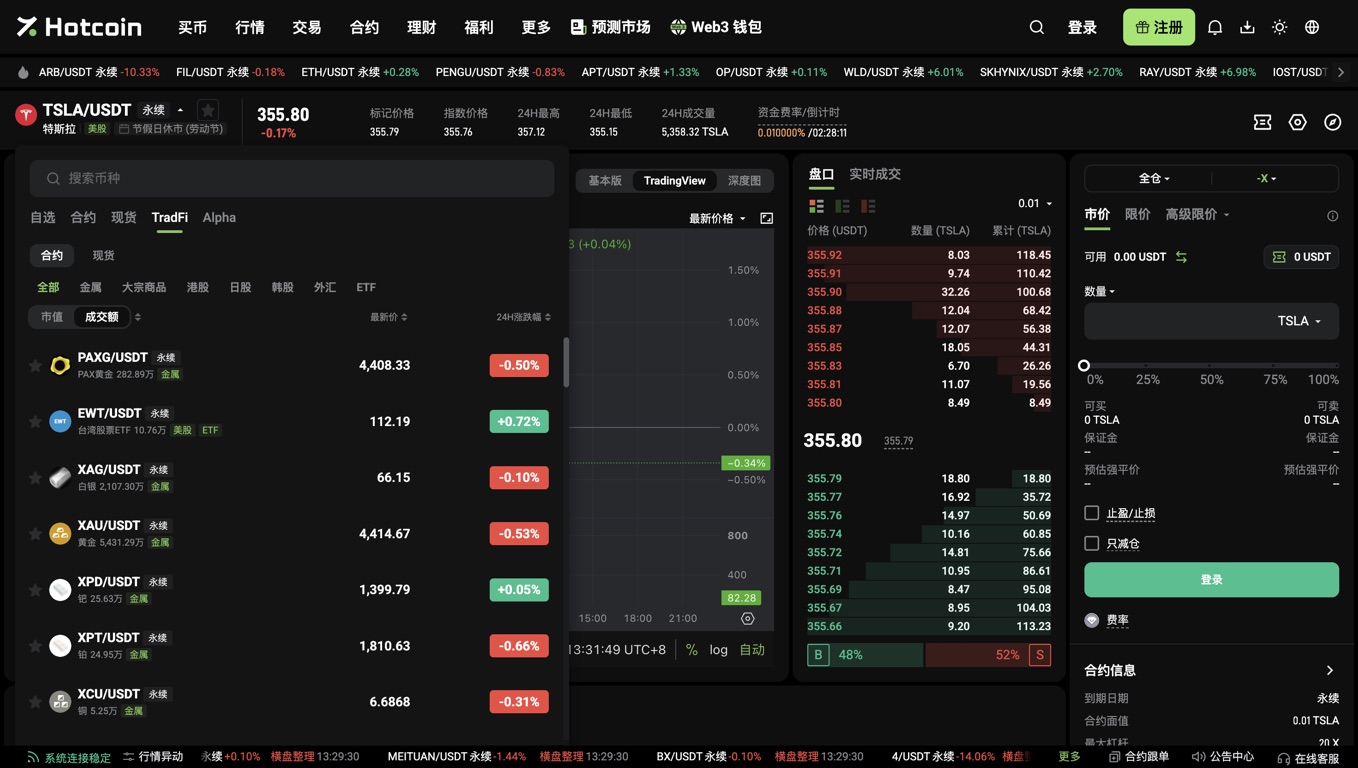
Page entry: Hotcoin TradFi; worked example: TSLA/USDT perpetual contract.
How do you confirm that you are on a stock contract page?
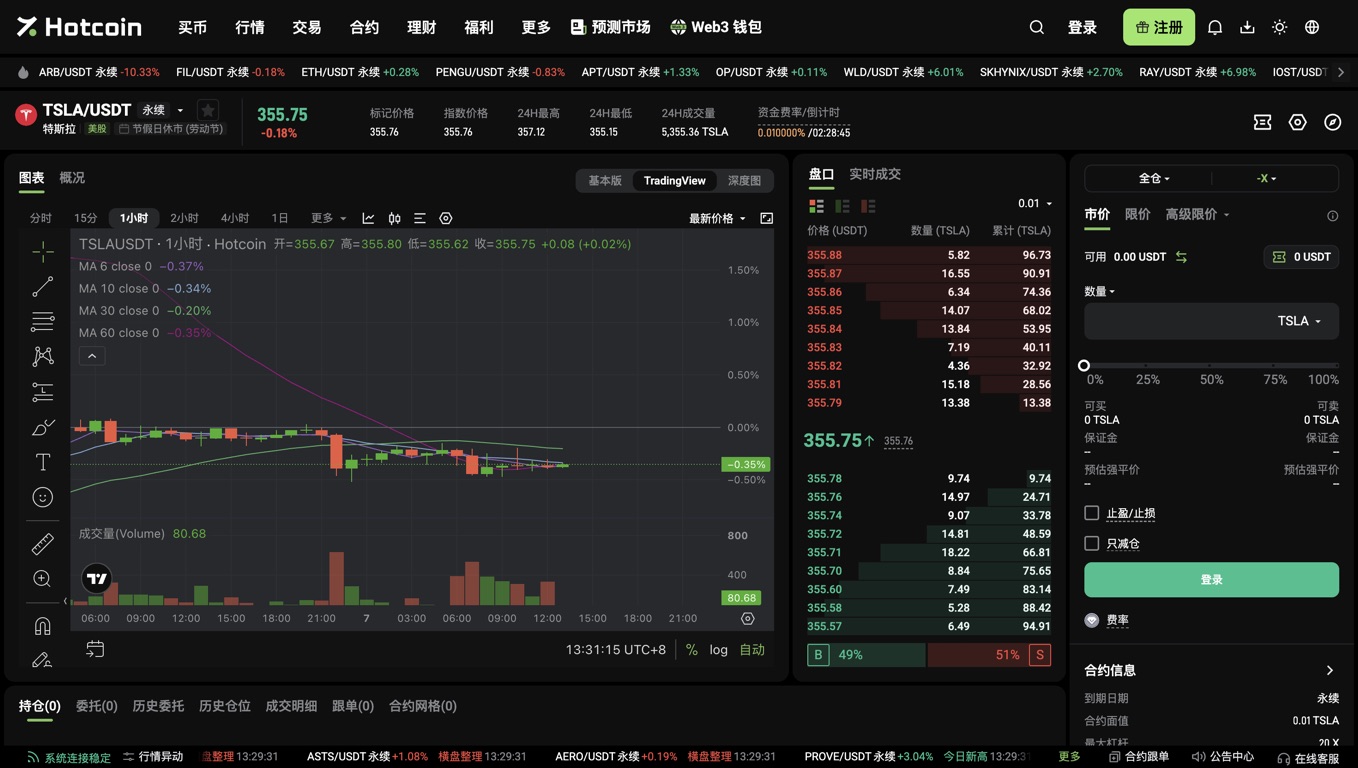
The TSLA/USDT perpetual contract page shows the mark price, the index price, the funding rate and margin-related fields at the same time, and these are what help you recognise a derivatives trade. The left side is mainly the chart, the middle is the order book, the right side is the order area, and the bottom holds the positions and orders entries. The “-X” and the login button in the screenshot come from a logged-out state; they do not mean the contract has no leverage, nor that an account has been opened or that an order can be submitted directly.
Why should you check the market-closure notice before ordering?
A stock contract whose quotes keep updating does not mean you can open a new position at any moment. In the screenshot, TSLA/USDT showed a Labour Day market-closure notice on 7 September 2026; when the underlying market closes or its trading hours change, the affected TradFi contracts move into reduce-only mode, where you may only reduce or close existing positions. Before acting, check the market status next to the product name, and do not read “perpetual” as meaning the contract is unaffected by trading status.
How do you confirm that your USDT is in the right account?
Before trading, check the available USDT shown in the order area rather than only the total account assets. When spot and futures use different trading accounts, you first need to transfer funds to the target account and verify the transfer direction, the coin and the amount. Then return to the relevant product page and confirm that the available balance has changed correctly; if it has not updated, check which account holds the funds and review the related records first, and do not make repeated deposits instead of investigating the transfer.
Screenshot pending: the USDT transfer dialog and the available balance after login. This article has not verified the specific fields and confirmation button of that dialog, so it does not show a fabricated successful-transfer screenshot.
How do you check the contract unit and the available leverage?
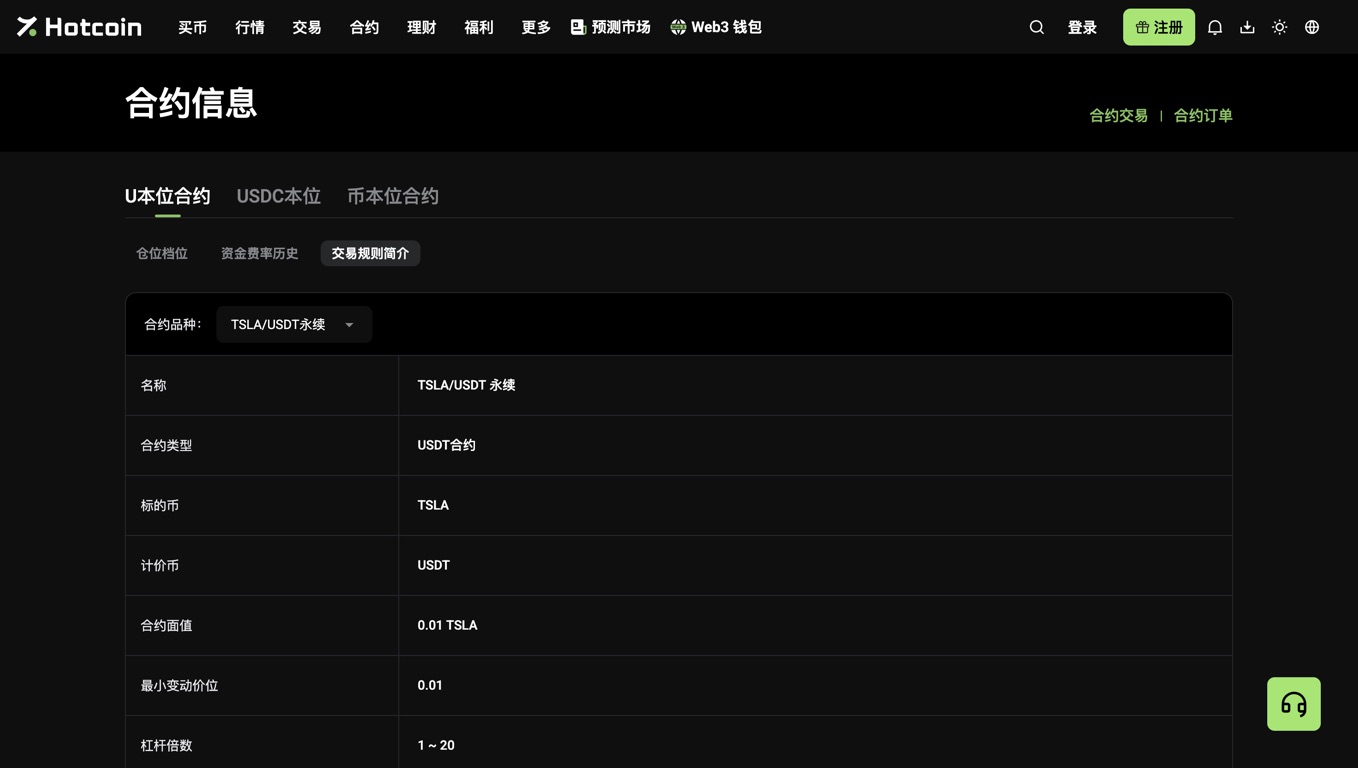
The “number of contracts” of a stock contract and a number of shares cannot be used interchangeably, so open the contract information first to see the face value. At the time of verification, the TSLA/USDT trading rules showed a face value of 0.01 TSLA per contract and a leverage range of 1x to 20x; here TSLA is the contract's unit of account and does not represent delivery of shares. The leverage actually available is also limited by rules such as position tiers, and other instruments or later versions cannot be assumed to use this same set of figures.
How do you choose between a market order and a limit order?
A market order executes at the quotes available at that moment, while a limit order lets you specify an acceptable execution price; the choice should not be made on speed of operation alone. The actual average price of a market order can be affected by order book depth and slippage, while a limit order may wait, fill partially or not fill at all. After choosing the type in the order area on the right, still check the quantity unit, the margin and the estimated liquidation price, so that you do not mistake the margin you put up for the full notional value of the order.
How should take-profit, stop-loss and reduce-only be understood?
In the contract order area, take-profit and stop-loss set risk-management conditions, while reduce-only restricts an order from increasing exposure; they solve different problems. A triggered stop-loss is not guaranteed to fill at the price you set, and slippage can still occur during fast moves or when liquidity is thin. A reduce-only option on the page also does not mean the market is closed; one is an order constraint and the other is a product trading status, and they must be checked separately rather than standing in for each other.
After submitting an order, how do you tell whether the trade is complete?
Submitting an order and completing a fill are two different outcomes, and a stock contract order should be cross-checked through open orders, trade details and position records. An order that has not filled does not automatically create a position, and a partial fill does not mean the entire quantity has been bought or sold. If you need to exit, check your existing position and the quantity you are closing, so that you do not place an opposite order without understanding the position mode and turn a closing action into new exposure on the other side.
FAQ
After buying a TSLA/USDT contract, do I own Tesla shares?
Buying a TSLA/USDT perpetual contract is not the same as owning Tesla shares; what you hold is a contract position linked to the price of the underlying asset. The result is affected by entry and exit prices, fees, leverage and margin rules, and it should not be understood as shareholding through a broker. In particular, the product name alone does not establish shareholder voting rights, share delivery rights, or dividend arrangements identical to those of a securities account; the rights attached to the product must be confirmed separately against the contract rules.
Why can I see quotes on the page but still not open a position?
When the Hotcoin TradFi page shows quotes but you cannot open a position, check the market status first, then your account eligibility and available margin. While the underlying market is closed, the affected contracts may allow only position reduction or closing; being logged out, insufficient balance or a quantity that breaks the rules can also prevent an order. When investigating, record the page notice and the trading pair name first, and do not conclude that the trading system is faulty or the account funds are abnormal merely because prices are still moving.
Do stock contracts only require trading fees?
The cost of holding a stock perpetual contract is not limited to the trading fee; you also need to consider funding costs and the bid-ask spread and slippage of actual fills. Funding rates can change, so a rate captured in one screenshot cannot be treated as a fixed long-term cost. Before ordering, check the fee information and the funding rate countdown on the order page and review your own membership fee rate; when calculating returns, use the result after deducting the relevant costs rather than comparing only the entry price with the latest price.
Product mechanics reference: TradFi FAQ. This article is for functional education only and is not investment advice or a promise of returns.
Recommended
View more