Airdrop Scams and Token Approval Traps: Protect Your Wallet
Fake airdrops use supposed "claim eligibility" to persuade users to connect their wallets and approve token spending. Connecting usually reveals only a wallet address; the permissions granted by subsequent signatures determine whether funds are at risk.
What Is the Difference Between Connecting a Wallet, Signing, and Approving?
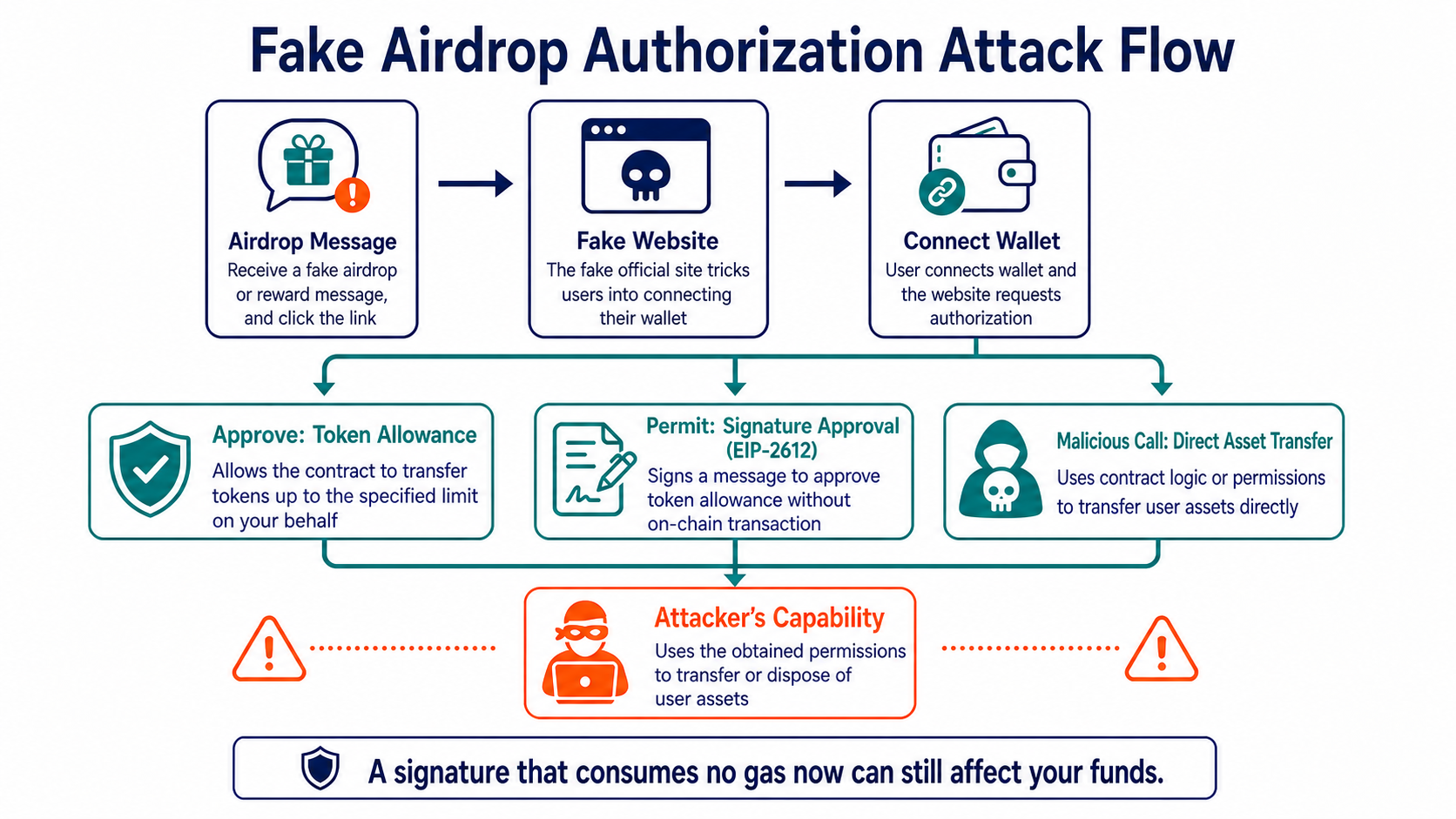
Connecting a wallet usually exposes only its address to a website and does not automatically transfer assets. A standard login signature can prove control of an address, but if its contents, domain, or purpose are unclear, it may be replayed or incorporated into an authorization flow.
Approve allows a Spender to call a token contract and transfer assets up to the approved amount. Signature-based authorizations such as Permit can be signed off-chain and later submitted on-chain by someone else. The fact that a user does not pay Gas at the time does not mean the signature cannot affect their funds.
A direct transaction may also invoke batch transfers, assign an operator, or upgrade a proxy. A wallet prompt should clearly show the contract, method, asset, amount, and recipient. Blind-signing a prompt that displays only hexadecimal data carries greater risk.
How Do Fake Airdrops Reach Victims?
Common entry points include tokens or NFTs that suddenly appear in a wallet, social media replies, search ads, impersonated project accounts, QR codes, and "eligibility checker" websites. Anyone can copy a token name or logo and create an on-chain asset.
Verify the legitimate entry point by cross-checking several official project channels, then confirm the domain and contract. Do not follow claim links in the description of a spam token in your wallet, and do not interact with its contract merely to remove the unwanted asset.
What Should You Do After Signing?
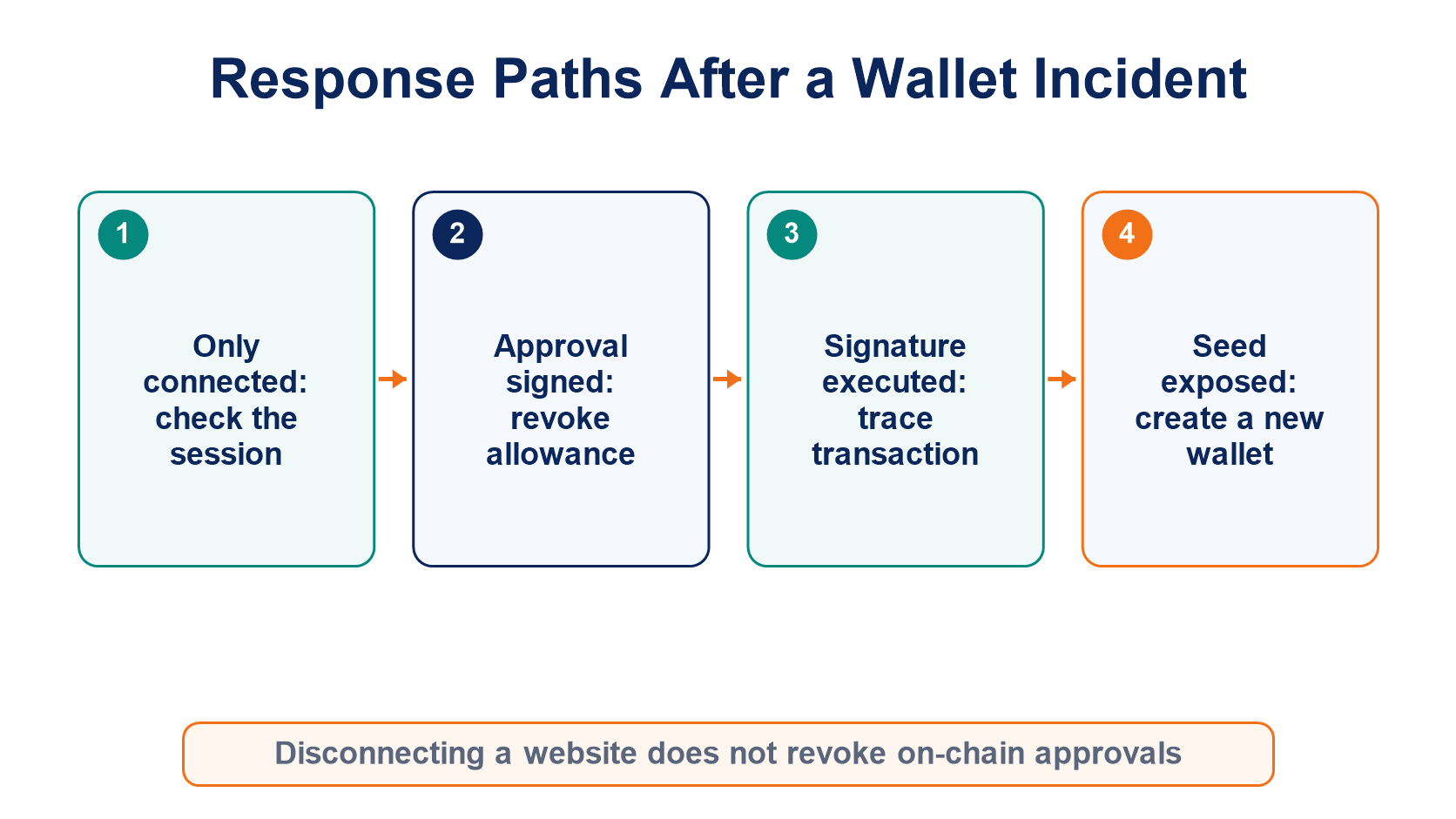
First, use a trusted block explorer or approval-checking tool to review current Spenders, tokens, and allowances, then revoke any permissions you no longer need. Revocation is itself an on-chain transaction and requires Gas on the correct network.
If assets continue to leave the wallet, determine whether the seed phrase, private key, or device has been compromised. When a key has leaked, revoking an approval only changes contract permissions temporarily; the attacker can still sign transactions directly, so move the remaining assets to a completely new wallet.
Preserve the malicious domain, contract, Spender, signature contents, and transaction hash. Do not reconnect to the same suspicious website to "revoke" access, and never provide screenshots or a seed phrase to unsolicited support agents.
For ongoing permission management, read Managing Wallet Approvals. To recognize support impersonation, see Fake Customer Support and Technical Support. For a broader overview, return to the Complete Guide to Cryptocurrency Scams.
Frequently Asked Questions
If My Wallet Shows "Sign" Instead of "Send," Are My Assets Safe?
Not necessarily. A signature may authorize a third party to submit a transaction later. Read the structured message and verify who receives the authorization.
Will Revoking an Approval Recover Tokens That Have Already Been Transferred?
No. Revocation only prevents future use of that approval; it cannot reverse a confirmed transfer.
Do I Need to Delete an Unknown Token From My Wallet Immediately?
Usually, you do not need to interact with it. You can hide spam assets in the wallet interface, while calling an unknown contract may introduce additional risk.
Is Setting a Limited Allowance Completely Safe?
No. A limited allowance reduces the impact of a single approval, but assets within that allowance may still be transferred, and a malicious transaction may request other permissions.
Inirerekumendang pagbabasa
Tingnan ang higit pa