Futures Profit Calculator: Estimating PnL and Liquidation Price
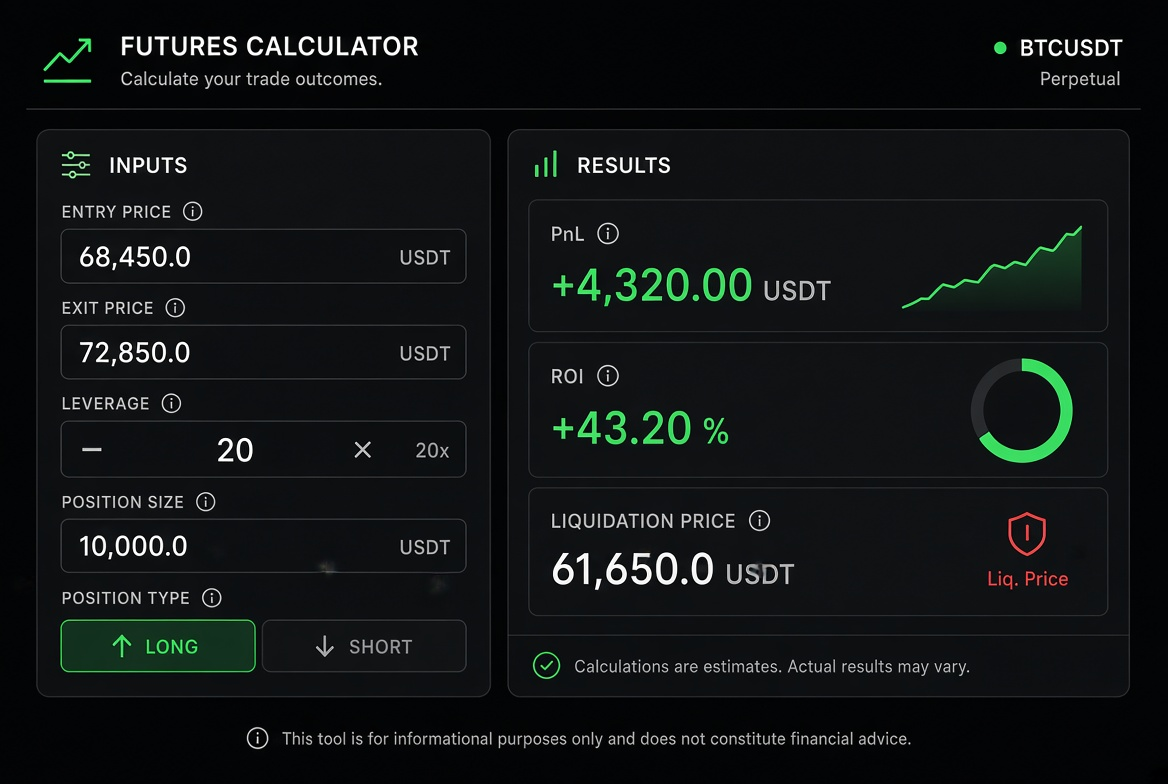
A futures profit calculator quickly estimates the profit or loss, the return on margin and the liquidation price of a position. Enter the entry price, leverage, position direction and size, and you get the numbers you need to judge the risk and the reward before committing funds.
Futures trading runs on high leverage and sharp swings, which makes manual PnL and liquidation price math error-prone. A dedicated futures profit calculator automates the formulas, so you can see the potential gain and the liquidation risk before opening a position or while holding one. This guide walks through how to use these tools efficiently in practice.
What Can a Futures Profit Calculator Work Out?
Mainstream calculators usually support these core functions:
PnL amount: actual profit or loss based on the entry price and the exit price (or the current price).
ROI: the return percentage relative to the margin.
Liquidation price: the price at which the position would be force-closed.
Margin requirement: the margin needed to open the position.
Long and short support: covers both long and short scenarios.
Leverage adjustment: compares results across different leverage multiples.
Some advanced tools also distinguish cross margin from isolated margin, and factor in trading fees and funding rates.
How to Use a Futures Profit Calculator (Step by Step)
Open the calculator built into an exchange (such as Hotcoin, Binance, OKX, Bitget and others) or a third-party professional tool.
Choose the direction: long or short.
Enter the entry price and the exit/target price (or the current price).
Fill in the position size (or notional value) and the leverage multiple.
Select the margin mode (isolated or cross, if the tool supports it).
Click calculate to see the PnL, the ROI and the liquidation price immediately.
Adjust the parameters and run several simulations to compare different leverage levels or target prices.
The process is intuitive, and far more efficient and accurate than applying the formulas by hand — a practical benefit that most top-ranking results explain poorly.
How to Read the Results Correctly
PnL amount: a positive number is a profit, a negative number is a loss. Check whether estimated fees have already been deducted.
ROI: shows efficiency relative to the margin, and high leverage inflates this figure.
Liquidation price: the most important risk-control reference. The closer the price gets to the liquidation price, the higher the risk of being liquidated.
Safety margin: after opening a position, watch the distance between the current price and the liquidation price, and leave enough of a buffer.
Common pitfalls and limitations:
Most calculators are static estimates and do not incorporate funding rates, liquidation fees or depth slippage in real time.
In cross margin mode, the liquidation price is affected by other positions in the account, so the result is only a reference.
In extreme markets, the actual liquidation price can deviate from the estimate because of thin liquidity.
Use Cases and Risk Warnings
Assessment before entry: simulate different leverage levels and target prices to judge whether the risk-reward ratio is acceptable.
Monitoring while holding: enter the current price to see the floating PnL and the distance to liquidation quickly.
Strategy comparison: use the calculator to compare different position management plans.
Risk warning: futures trading carries high risk and can wipe out your entire principal. Calculator results are estimates only and do not constitute investment advice. Control your position size strictly, set stop losses, and fully understand the exchange's liquidation rules. Only ever use funds you can afford to lose.
Frequently Asked Questions (FAQ)
**Q1: How is the liquidation price calculated?**A: It is mainly based on the entry price, the leverage and the maintenance margin rate. Maintenance margin rates differ slightly between exchanges, so results vary a little.
**Q2: Does the PnL shown by the calculator include fees?**A: Some tools let you tick a box for fees, while others only calculate the price difference. Check before you use one, or set the fee cost aside manually.
**Q3: What is the difference between the liquidation price in cross margin and isolated margin mode?**A: In isolated margin mode, the liquidation price relates only to that position; in cross margin mode it is affected by all positions and the balance in the account, so the calculator result is usually more conservative or needs extra adjustment.
**Q4: Why does the actual liquidation price differ from the calculator result?**A: Possible reasons include funding rates, liquidation fees, the difference between the mark price and the last price, and slippage caused by thin liquidity.
**Q5: What should beginners focus on most when using a futures calculator?**A: Focus first on the distance between the liquidation price and the current price, and only then on the potential ROI. Higher returns usually come with a higher risk of liquidation.
With these methods you can use a futures profit calculator efficiently and estimate the PnL and the liquidation price in advance. Make it a habit before every entry, and combine it with stop losses and position management to keep risk under control. Markets swing violently, and staying rational and disciplined is the key to long-term survival.
Inirerekumendang pagbabasa
Tingnan ang higit pa